6手机数据处理
在这个例子中,我们将介绍如何使用TransBigData来处理手机数据。
首先,导入TransBigData并使用pandas读取数据
[1]:
import pandas as pd
import transbigdata as tbd

data = pd.read_csv(r'data/mobiledata_sample.csv')
#make sure the time column is correct
data['stime'] = pd.to_datetime(data['stime'], format='%Y%m%d%H%M')
data = data.sort_values(by = ['user_id','stime'])
data.head()
[1]:
| user_id | stime | longitude | latitude | date | |
|---|---|---|---|---|---|
| 78668 | 00466ab30de56db7efbd04991b680ae1 | 2018-06-01 00:00:00 | 121.43 | 30.175 | 20180601 |
| 78669 | 00466ab30de56db7efbd04991b680ae1 | 2018-06-01 03:35:00 | 121.43 | 30.175 | 20180601 |
| 78670 | 00466ab30de56db7efbd04991b680ae1 | 2018-06-01 04:25:00 | 121.43 | 30.175 | 20180601 |
| 78671 | 00466ab30de56db7efbd04991b680ae1 | 2018-06-01 05:15:00 | 121.43 | 30.175 | 20180601 |
| 78289 | 00466ab30de56db7efbd04991b680ae1 | 2018-06-01 06:05:00 | 121.43 | 30.175 | 20180601 |
从手机轨迹数据中识别停留和移动信息
在处理手机数据时,TransBigData的方法是首先将数据与网格对应,并将同一网格内的数据视为位于同一位置,以避免导致同一位置被识别为多个位置的数据定位错误。
[2]:
#Obtain gridding parameters
params = tbd.area_to_params([121.860, 29.295, 121.862, 29.301], accuracy=500)
#Identify stay and move infomation from mobile phone trajectory data
stay,move = tbd.mobile_stay_move(data,params,col = ['user_id','stime','longitude', 'latitude'])
[3]:
stay.head()
[3]:
| user_id | stime | LONCOL | LATCOL | etime | lon | lat | duration | |
|---|---|---|---|---|---|---|---|---|
| 0 | 00466ab30de56db7efbd04991b680ae1 | 2018-06-01 00:00:00 | -83 | 196 | 2018-06-01 07:21:00 | 121.432040 | 30.176335 | 26460.0 |
| 1 | 00466ab30de56db7efbd04991b680ae1 | 2018-06-01 07:36:00 | -81 | 191 | 2018-06-01 12:02:00 | 121.442352 | 30.153852 | 15960.0 |
| 2 | 00466ab30de56db7efbd04991b680ae1 | 2018-06-01 12:20:00 | -83 | 196 | 2018-06-01 13:04:00 | 121.432040 | 30.176335 | 2640.0 |
| 3 | 00466ab30de56db7efbd04991b680ae1 | 2018-06-01 14:34:00 | -60 | 189 | 2018-06-01 23:12:00 | 121.550631 | 30.144858 | 31080.0 |
| 4 | 00466ab30de56db7efbd04991b680ae1 | 2018-06-02 00:02:00 | -83 | 196 | 2018-06-02 09:36:00 | 121.432040 | 30.176335 | 34440.0 |
[4]:
move.head()
[4]:
| user_id | SLONCOL | SLATCOL | stime | slon | slat | etime | elon | elat | ELONCOL | ELATCOL | duration | |
|---|---|---|---|---|---|---|---|---|---|---|---|---|
| 0 | 00466ab30de56db7efbd04991b680ae1 | -83 | 196 | 2018-06-01 07:21:00 | 121.432040 | 30.176335 | 2018-06-01 07:36:00 | 121.442352 | 30.153852 | -81.0 | 191.0 | 900.0 |
| 1 | 00466ab30de56db7efbd04991b680ae1 | -81 | 191 | 2018-06-01 12:02:00 | 121.442352 | 30.153852 | 2018-06-01 12:20:00 | 121.432040 | 30.176335 | -83.0 | 196.0 | 1080.0 |
| 2 | 00466ab30de56db7efbd04991b680ae1 | -83 | 196 | 2018-06-01 13:04:00 | 121.432040 | 30.176335 | 2018-06-01 14:34:00 | 121.550631 | 30.144858 | -60.0 | 189.0 | 5400.0 |
| 3 | 00466ab30de56db7efbd04991b680ae1 | -60 | 189 | 2018-06-01 23:12:00 | 121.550631 | 30.144858 | 2018-06-02 00:02:00 | 121.432040 | 30.176335 | -83.0 | 196.0 | 3000.0 |
| 4 | 00466ab30de56db7efbd04991b680ae1 | -83 | 196 | 2018-06-02 09:36:00 | 121.432040 | 30.176335 | 2018-06-02 10:56:00 | 121.406259 | 30.176335 | -88.0 | 196.0 | 4800.0 |
家庭和工作地点标识
[5]:
#Identify home location
home = tbd.mobile_identify_home(stay, col=['user_id','stime', 'etime','LONCOL', 'LATCOL','lon','lat'], start_hour=8, end_hour=20 )
home.head()
[5]:
| user_id | LONCOL | LATCOL | lon | lat | |
|---|---|---|---|---|---|
| 1781 | fcc3a9e9df361667e00ee5c16cb08922 | -147 | 292 | 121.102046 | 30.608009 |
| 1769 | f71e9d7d78e6f5bc9539d141e3a5a1c4 | -216 | 330 | 120.746272 | 30.778880 |
| 1752 | f6b65495b63574c2eb73c7e63ae38252 | -225 | -286 | 120.699867 | 28.008971 |
| 1739 | f1f4224a60da630a0b83b3a231022123 | 102 | 157 | 122.385927 | 30.000967 |
| 1700 | e96739aedb70a8e5c4efe4c488934b43 | -223 | 278 | 120.710179 | 30.545056 |
[6]:
#Identify work location
work = tbd.mobile_identify_work(stay, col=['user_id', 'stime', 'etime', 'LONCOL', 'LATCOL','lon','lat'], minhour=3, start_hour=8, end_hour=20,workdaystart=0, workdayend=4)
work.head()
[6]:
| user_id | LONCOL | LATCOL | lon | lat | |
|---|---|---|---|---|---|
| 0 | fcc3a9e9df361667e00ee5c16cb08922 | -146 | 292 | 121.107203 | 30.608009 |
| 1 | f71e9d7d78e6f5bc9539d141e3a5a1c4 | -219 | 325 | 120.730804 | 30.756397 |
| 2 | f6b65495b63574c2eb73c7e63ae38252 | -225 | -286 | 120.699867 | 28.008971 |
| 3 | f1f4224a60da630a0b83b3a231022123 | 103 | 153 | 122.391083 | 29.982981 |
| 5 | e1a1dfb5a77578c889bd3368ffe1d30f | -62 | 138 | 121.540319 | 29.915532 |
[7]:
# If you want to filter out the users with work place location from home location
home['flag'] = 1
work = pd.merge(work,home,how='left')
home = home.drop(['flag'],axis = 1)
work = work[work['flag'].isnull()].drop(['flag'],axis = 1)
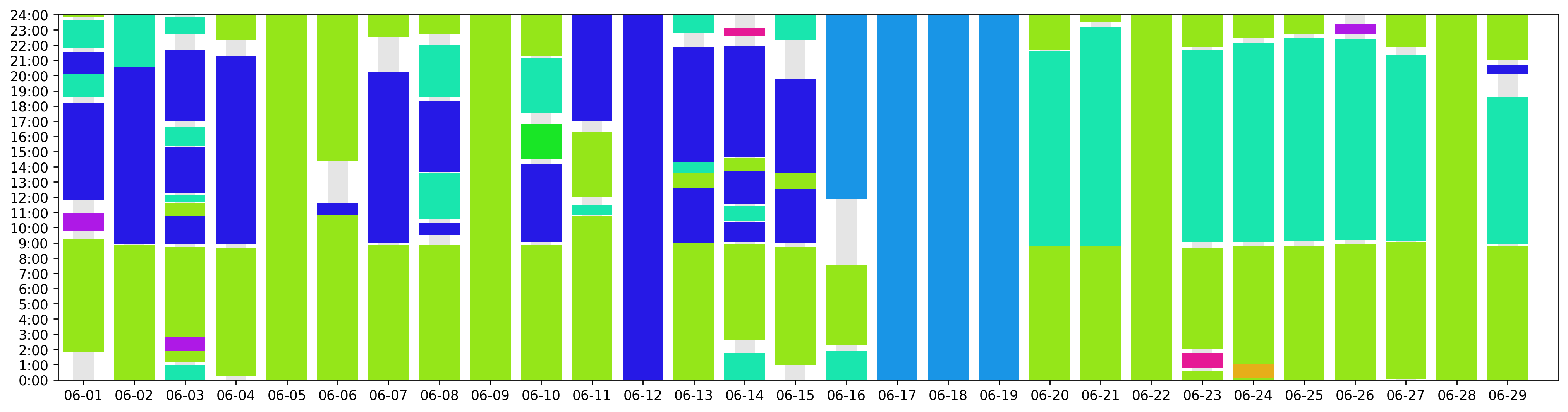
绘制活动图
[8]:
#Plot the activity of the user, different color represent different location
uid = 'fcc3a9e9df361667e00ee5c16cb08922'
stay['group'] = stay['LONCOL'].astype(str)+','+stay['LATCOL'].astype(str)
tbd.plot_activity(stay[stay['user_id']==uid],figsize = (20, 5))